Hey, what’s up? It’s Takuya here.
This is the first release candidate for v6!
Unlike the canary versions, it now uses the same user data directory as v5.
So, some data migration will happen when you launch it, and you can’t roll it back.
I tested thoroughly to make sure you won’t lose your important data after the migration, but it’d be good to copy the whole user directory beforehand if you are worried.
If you have any issues during the migration, please let me know!
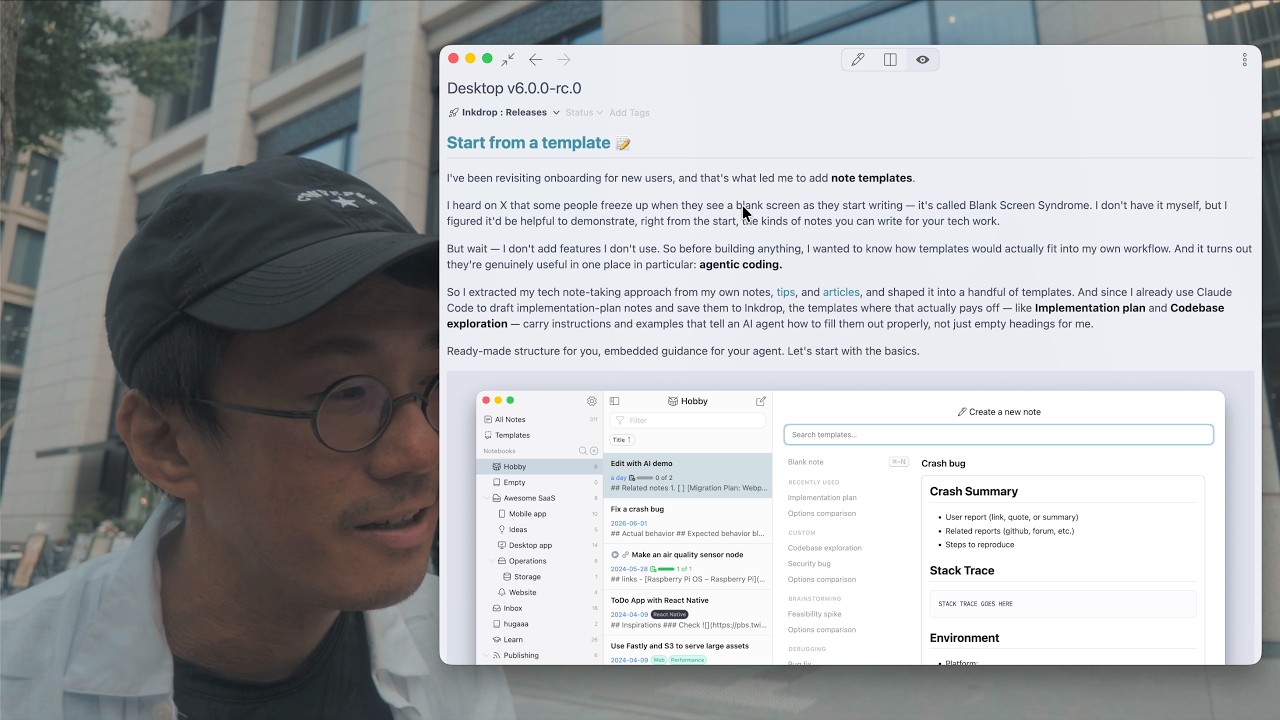
Start from a template 
I’ve been revisiting onboarding for new users, and that’s what led me to add note templates.
I heard on X that some people freeze up when they see a blank screen as they start writing — it’s called Blank Screen Syndrome. I don’t have it myself, but I figured it’d be helpful to demonstrate, right from the start, the kinds of notes you can write for your tech work.
But wait — I don’t add features I don’t use. So before building anything, I wanted to know how templates would actually fit into my own workflow. And it turns out they’re genuinely useful in one place in particular: agentic coding.
So I extracted my tech note-taking approach from my own notes, tips, and articles, and shaped it into a handful of templates. And since I already use Claude Code to draft implementation-plan notes and save them to Inkdrop, the templates where that actually pays off — like Implementation plan and Codebase exploration — carry instructions and examples that tell an AI agent how to fill them out properly, not just empty headings for me.
Ready-made structure for you, embedded guidance for your agent. Let’s start with the basics.
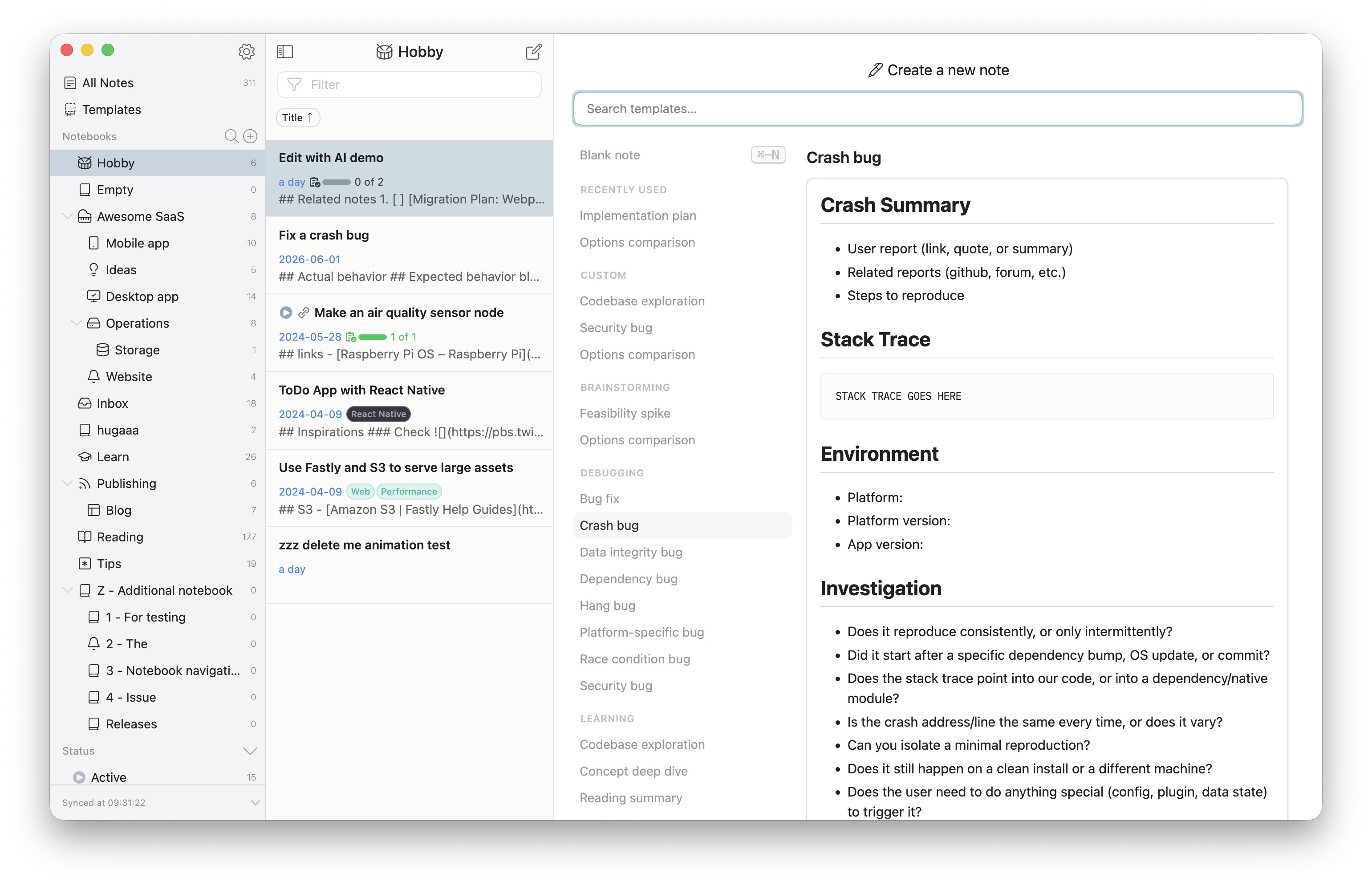
The editor’s blank slate is now a template picker. Whenever you land on an empty editor — say, right after hitting Cmd/Ctrl+N — you can search templates by name, preview one on the right, and pick it to start writing. Prefer a clean sheet? A blank note is still right there.
Inkdrop ships with a curated set of official templates, grouped by category — Debugging, Planning, Brainstorming, Learning, and Productivity — so there’s something to start from on day one. Your most recently used ones float to the top under Recently used.
You can build your own, too. Custom templates live in a dedicated Templates section in the sidebar, and they support a small, safe templating syntax (powered by LiquidJS — no arbitrary code ever runs, even from a synced or shared template). That’s enough for handy touches like a self-dating title:
---
_template:
  title: "{{ 'now' | date: '%Y-%m-%d' }} - Daily Report"
  description: What I did today, what I plan to do tomorrow, and any blockers.
  tags:
    - Journal
  notebook: "Daily notes"
  status: active
---

## What I worked on
...
A template can preset the new note’s title, description, tags, destination notebook, and status. Want to tweak an official template? Just start editing it — Inkdrop automatically forks it into an editable copy of your own and leaves the original untouched.
Templates your coding agent can fill out 
Here’s the part I got most excited about. A template is just a note — so it can also carry instructions and examples aimed at an AI agent, not only at you.
While writing a template, drop in a guidance block: a blockquote whose heading starts with !, like > # !Instructions or > # !Example. An agent reads these to learn how to complete the note, but they’re stripped automatically from the notes you actually create — so the guidance stays in the template and never leaks into your plan.
Two open-source companions make this click:
- Inkdrop MCP server — the hands. A Model Context Protocol server that lets your agent
create-note,read-note,update-note, and more against your local Inkdrop. Read a note that was created from a template and it pulls in that template’s instructions in the same call. - Inkdrop Skills — the know-how. Agent Skills that teach your agent Inkdrop’s Markdown dialect and note-driven workflows. Its
/fill-out-templateskill reads a templated note alongside its instructions, fills in the scaffold, and then stops for your review before writing any code.
Install the skills with a single command — it works with Claude Code, Codex, Cursor, and dozens of other agents:
npx skills@latest add inkdropapp/skills
My own loop: I ask Claude Code to spin up a note from my Implementation plan template, it fills the plan out by following the template’s embedded instructions, I review and refine it in Inkdrop — and only then do we write code. The template keeps every plan consistent and keeps the agent on the rails. Templates work perfectly well on their own, but this is where they really start to shine. 
Want the full details? The Note templates guide walks through creating custom templates, every frontmatter field, dynamic dates, and the AI guidance blocks.
No more [conflicted] notes 
One of the most annoying frictions in Inkdrop is gone. Before, if a note changed on another device (via sync) while you were editing it, saving would spin off a [conflicted] backup note for you to reconcile by hand.
Now Inkdrop merges the two versions for you. If the other side only touched the body, your edits and theirs are combined with a 3-way merge. Title, notebook, status, and tags merge without losing data from either side. The old [conflicted] backup only shows up in the rare case of genuinely overlapping edits to the same lines — and this same smarter merge now runs during sync as well.
Resize images right in the editor 
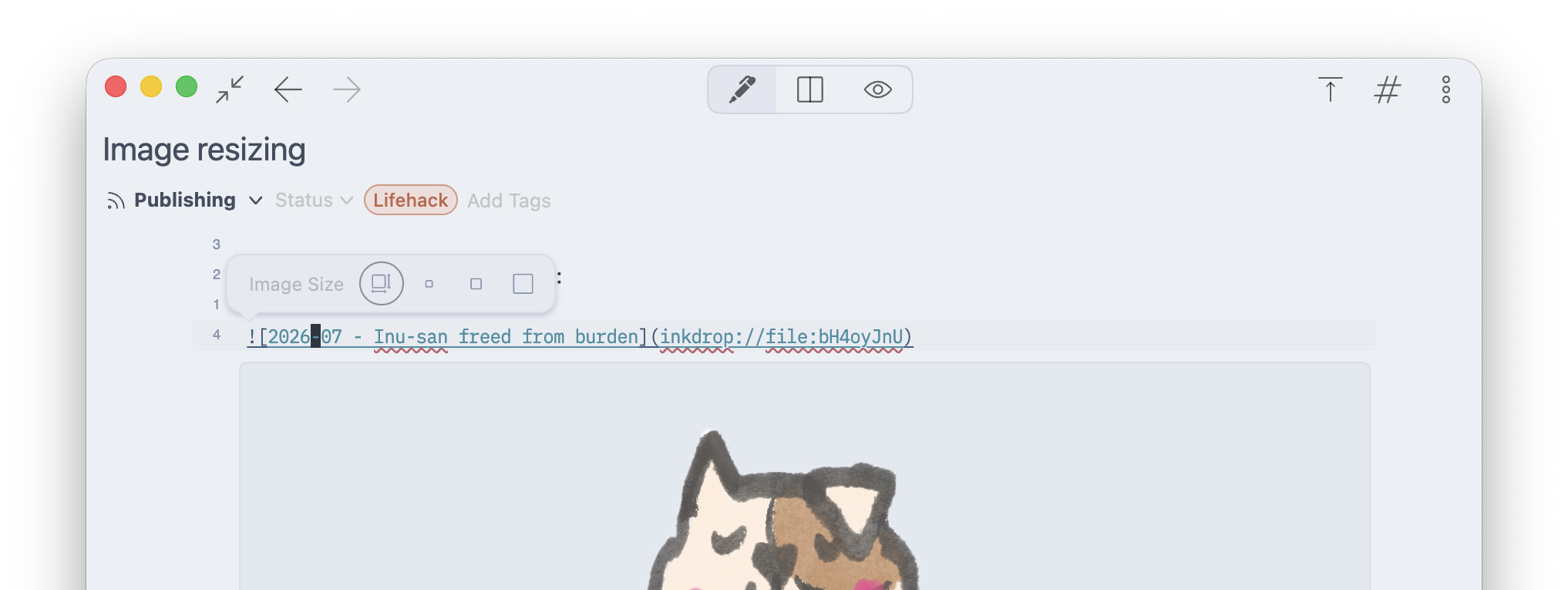
Inkdrop now understands Marp-style image size specifiers, so you can control how large an image renders straight from Markdown:


And you don’t have to memorize the syntax — put your cursor on an image and a little resize toolbar pops up with one-tap Auto / Small / Half / Full presets.
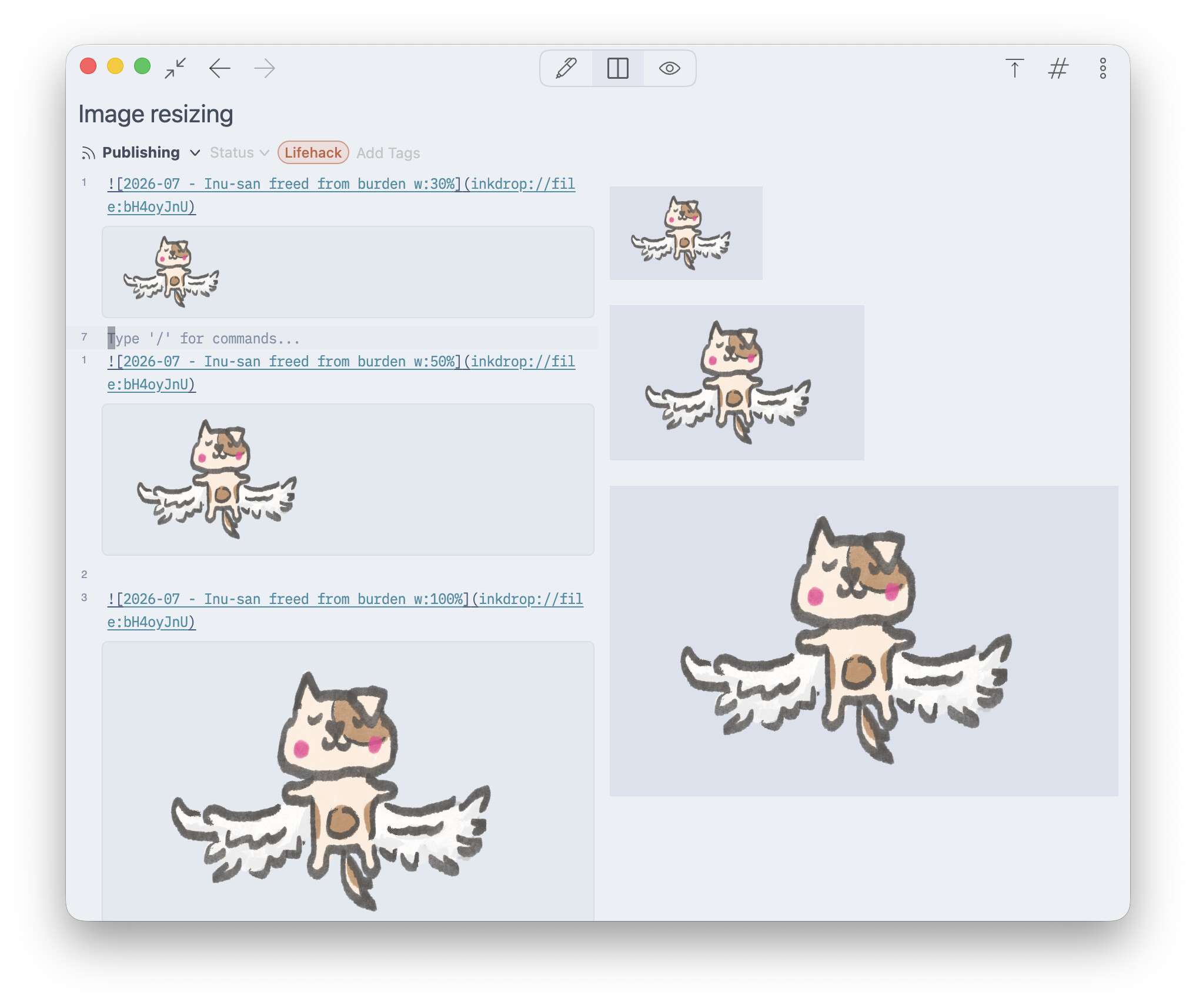
Want the full syntax? The Resize images guide covers the toolbar presets, writing specifiers by hand, and every supported unit.
Other improvements
A smoother Markdown import 
Import from Markdown has been rebuilt as a single wizard. It now asks for your files first, then walks you through one dialog — Scan → Stats (how many files, total size) → pick a notebook → Import — instead of making you choose a destination before you’ve even said what to import.
Importing also handles embedded base64 images now: data: image URIs inside your Markdown are extracted and saved as real attachments instead of being dropped.
A tidier sidebar & friendlier empty states
- The Pinned section has been retired from the sidebar. Pinned notes now simply sort to the top of the All Notes view — one less mode to think about.
- Blank slates got a lot friendlier. Empty notebooks, empty tags, and empty status filters now greet you with a short note about what belongs there, instead of a blank pane.
Coming from v5? A gentler migration 
v6 carries a lot of breaking changes under the hood, so this release works hard to keep your old customizations from tripping things up on first launch:
- An incompatible
init.js— one using APIs removed in v6 — is detected and safely disabled (renamed toinit.js.bak) before it can run, with a notification linking to the migration guide. styles.lessis no longer loaded (v6 uses plain-CSS user stylesheets); a warning in Preferences → Themes points you to migrate it.- A couple of obsolete plugins that still claimed v6 support (
copy-as-jira,pandoc) are now deprecated so they can’t misbehave. - You’ll see alert tips in the sidebar and warnings in Preferences whenever any of these stale files are found, so nothing breaks silently.
Bug fixes 
- Fixed invisible-character (whitespace) markers not matching the editor’s font size. (Thanks @dgavrilov)
- Notebook quick-switcher fixes: arrow-key navigation no longer jumps back to the top match, the notebook you click now highlights correctly, and only the top result auto-highlights while you’re searching.
- Fixed updating a theme from Preferences → Available updates only “previewing” the change instead of actually applying it — it wouldn’t stick until you switched to a different theme and back. (Thanks bdiego)
Download now
The binary links are available here:
That’s it for the release candidate. Thank you, as always, for testing along the way — the official v6 launch is almost here 