 I have checked the troubleshooting
Bug report
I have notes in a notebook that read
- v3 :: Backstory :: Run 01
- v3 :: Backstory :: Run 02
- v3 :: Backstory :: Run 03
- v3 :: Hochzeitstage
- v3 :: My Draft :: Full
and these should be sorted exactly like this when I sort them A-Z.
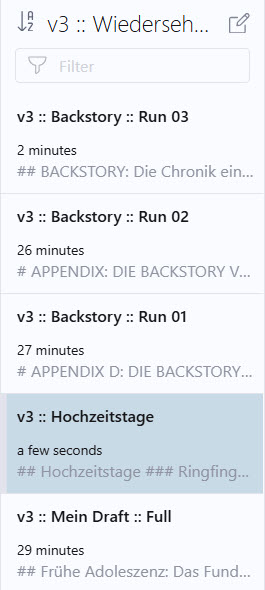
However, Inkdrop mistakenly sorts 01-03 exactly the other way around, namely in descending order from 03 to 01. So within this group, it sorts in descending order, but overall in ascending order.
What I end up with is the following sorting: - v3 :: Backstory :: Run 03
- v3 :: Backstory :: Run 02
- v3 :: Backstory :: Run 01
- v3 :: Hochzeitstage
- v3 :: My Draft :: Full
In principle, Inkdrop shouldn’t form subgroups but simply sort everything correctly in ascending order from top to bottom.
I’d appreciate it if you could fix this bug sometime when you have the time. It’s certainly not a top-priority bug, but it’s worth mentioning.
Thank you very much
Achim
See this Screenshot:
Environment
- Platform: Windows 11
- Platform version: 25H2 64-bit
- App Version: 5.11.8
How to reproduce
Create the following Notes in a Notebook:
- v3 :: Backstory :: Run 01
- v3 :: Backstory :: Run 02
- v3 :: Backstory :: Run 03
- v3 :: Hochzeitstag
- v3 :: My Draft :: Full
Go to View → Sort by Title A → Z.