I started a new job a few months ago where I unfortunately only have access to 1080p Monitors. As space is really constrained there I thought about ways to save some space
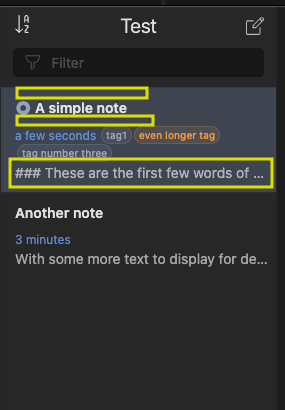
In the picture I’ve highlighted the padding above and below the title which I think could be reduced, as well as the complete removal of the first few words of a note. Personally I never look at that and only check the title.
The goal is to be able to view more notes.
So my suggestion would be compact mode checkbox in the settings that:
removes padding
removes the beginning note content
optional: puts the time/date in the same line as the title, when the title is short. Maybe bad idea as datetime would be on the right in that case which is incosistent with the normal placement
optional: maximum show one line of tags instead of all of them
Can you try reinstalling the plugin? I found that the server unexpectedly listed the old versions of the packages for v5. I fixed the server, and I confirmed the app installs simple-note-list@v0.5.1 properly.

 Thank you