Edit toolbar doesn't show up since v6 update on Android

Bug report

On my Android phone, the edit toolbar is no longer visible starting with the Inkdrop v6 update. I’ve looked at settings, but don’t see anything I can do to make it re-appear.

Typing / works, but that’s not helpful when what I want to do is select a word or a block of text, then apply a Markdown format.

Environment

  • Platform: Android
  • Platform version: 14
  • App Version: 6.0.2 (156)

How to reproduce

Hi @Emilio_Mayorga ,

Thanks for the report. That’s weird. What’s your device model? Can you share a screenshot?

Thanks for your follow up. The device is a Pixel 5.

I’m including a photo of the phone with Inkdrop on, instead of a screenshot. When I try to take a screenshot per se, the Google keyboard always gets hidden. So, the photo shows what I see more faithfully.
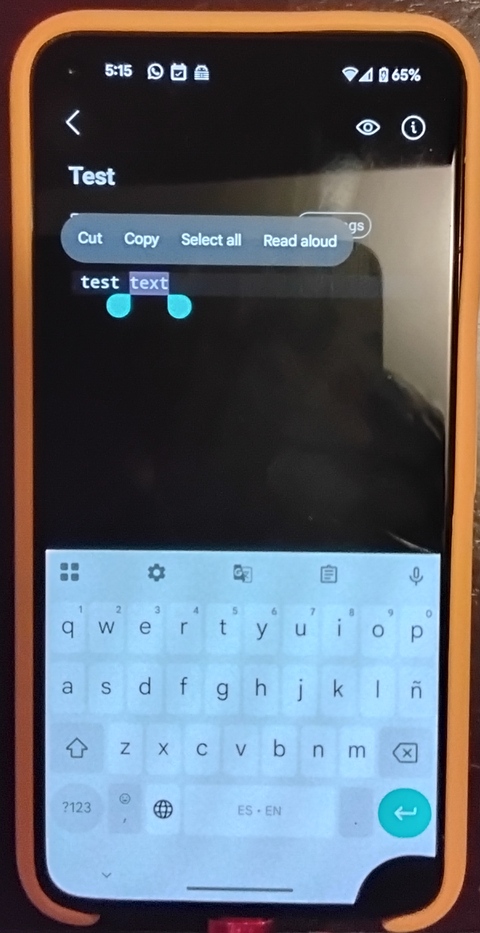
OK, I got it to reproduce on my Pixel 5! This is interesting.. I’ll fix it in the next release. Thanks!

Looks like this is due to the edge-to-edge feature, which isn’t available <= Android 14.

I’m glad you were able to reproduce it. Thanks.
BTW, I love the edit toolbar on Android (before v6)!

I published a patched version 157 (6.1.0) to the open beta channel. Could you try it from here?

I tested it on my Pixel 5 and it worked fine.

I joined the beta channel just now and got v6.1.0 (160). The editor toolbar is back. Thanks so much!!