 I have checked the troubleshooting
Bug report
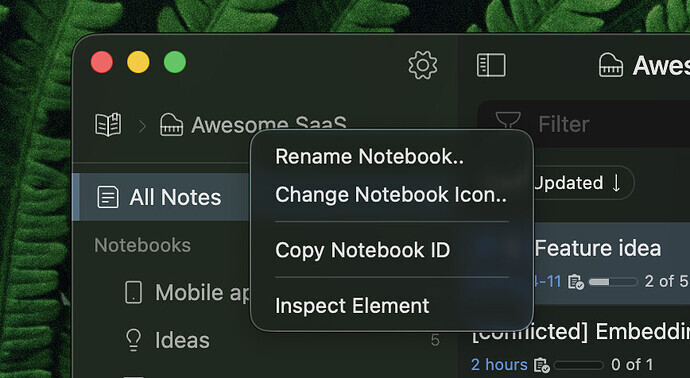
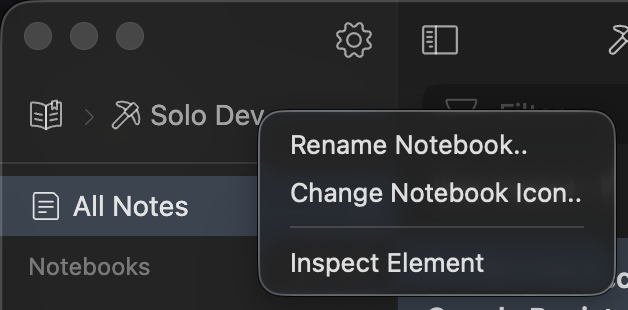
The “Copy Notebook ID” option is missing from the notebook header context menu.
According to the release notes this action should be available (alongside “Copy Tag
ID” for tags), but right-clicking the notebook header in the breadcrumb only shows
Rename Notebook, Change Notebook Icon, and Inspect Element — no Copy Notebook ID
entry.
Environment
- Platform: macOS
- Platform version: Tahoe 26.5
- App Version: 6.0.0-canary.16
How to reproduce
- Open the Inkdrop desktop app.
- Select any notebook (e.g. “Solo Dev”) so its name appears in the header
breadcrumb. - Right-click the notebook name in the header.
- Observe the context menu.
Expected: menu includes “Copy Notebook ID” (as shown in the reference
screenshot for “Awesome SaaS”).
Actual: menu only shows Rename Notebook, Change Notebook Icon, and Inspect
Element. “Copy Notebook ID” is missing.
Notes
- Same issue likely applies to “Copy Tag ID” from the tag header — worth
confirming. - Screenshots: reference (working, “Awesome SaaS”) and current state (“Solo Dev”, missing entry) attached.

